How to Make a Collage on Instagram Story: 5 Easy Ways (With Videos & Music)
Put multiple photos and videos in one Instagram story. 5 easy ways, with Layout or without it, plus 30 story collage ideas, sizes, and fixes when Layout is missing.

In this article
- Which method should you use?
- Method 1: Use Layout (the built-in grid)
- Method 2: Use photo stickers (the scrapbook look)
- Method 3: Copy and paste photos (iPhone)
- Method 4: Make the collage in a collage app (best looking)
- Method 5: Make a video collage with music
- How to add music to a story collage
- Instagram story collage size and safe zones
- 30 Instagram story collage ideas
- Tips for a story collage people actually look at
- Problems and fixes
- The quick answer
You have six great photos from last night and one story slot. Posting them one by one is slow, and people tap past most of them. A story collage shows all of them at once, in one tap.
Here are five ways to make a collage on Instagram story. The first three use Instagram's own tools. The last two give you more control, including video collages with music, which Instagram cannot do on its own.
Instagram changes its buttons often. If something looks slightly different on your phone, the idea is still the same.
Which method should you use?
| Method | Best for | Videos? | Free? |
|---|---|---|---|
| 1. Layout | A quick, neat grid | No | Yes |
| 2. Photo stickers | A free, scrapbook look | No | Yes |
| 3. Copy and paste (iPhone) | Adding photos fast | No | Yes |
| 4. Collage app | Designed collages with text and stickers | Yes | Free to start |
| 5. Video collage app | Several clips at once, with music | Yes | Free to start |
Method 1: Use Layout (the built-in grid)
Layout puts photos into a simple grid inside the story camera. It is the fastest option.
- Open the story camera. Swipe right from your feed, or tap the + button and choose Story.
- Find Layout. It is in the tool list on the left side. Tap the small arrow if you do not see it.
- Pick a grid. Tap the grid icon to switch between layouts.
- Fill each square. Take a photo, or tap the gallery icon to pick one from your camera roll.
- Fix a photo. Tap a square to retake or delete it before you finish.
- Tap the check mark, then add text or stickers.
- Share to Your story or Close Friends.
Good for: quick daily updates. Not good for: videos, custom shapes, or anything that needs to look designed.
Method 2: Use photo stickers (the scrapbook look)
This lets you place photos anywhere, at any size, on top of a background.
- Open the story camera and pick a background photo, or a plain color.
- Tap the sticker icon at the top.
- Tap the Photo sticker. It shows a small preview of your latest photo.
- Choose a photo. It appears on top of your story.
- Pinch to resize and drag to move it. Tap it to change the frame shape.
- Repeat for each photo you want.
- Share your story.
Tip: Tilt each photo slightly and overlap the edges. It looks like a real scrapbook page.
Method 3: Copy and paste photos (iPhone)
This is the fastest way to add many photos without the sticker menu.
- Open the Photos app and find a photo.
- Tap Share, then Copy Photo.
- Open Instagram and start a new story with a background.
- Tap the text tool (Aa), then tap and hold the screen and choose Paste. On many phones, a paste button also appears on its own.
- Move and resize the pasted photo.
- Repeat for each photo, then share.
You can also cut a person out of a photo by touching and holding them in the Photos app, then tapping Copy. Paste the cutout into your story for a sticker of yourself.
Method 4: Make the collage in a collage app (best looking)
Instagram's tools are quick, but every collage made with them looks the same. A collage app gives you real templates, fonts, frames, and stickers, then you upload one finished image.
Here is how with CollageFlow:
- Start a new collage. Pick a template, a layout, or describe your idea to the AI Collage Creator.
- Tap Ratio and choose 9:16. This is the exact story shape, so nothing gets cropped.
- Tap each slot to add a photo. Pinch to zoom inside the frame.
- Add a title with Text, and decorate with Stickers.
- Tap Save. The collage goes to your Photos.
- Open Instagram, start a story, and pick the collage from your camera roll.
Method 5: Make a video collage with music
This is the one Instagram cannot do. Layout is for photos only, and you cannot play several videos at once inside a story. If you want four clips playing side by side, you need an app.
- Start a new collage in CollageFlow and tap Ratio, then 9:16.
- Pick a layout with 2 to 4 slots. Video needs room to be seen.
- Tap each slot and choose a video. You can mix in photos too.
- Add an animated title. Tap Text, then turn on animation.
- Add music in the Music panel.
- Tap Save. You get one video file.
- Upload it as a normal story.
Keep the whole video under 60 seconds, so Instagram shows it as one story instead of splitting it. Our full guide covers how to make a video collage on iPhone.
How to add music to a story collage
- On Instagram: after you add the collage to your story, tap the sticker icon, choose Music, and pick a song. You can choose the part of the song that plays.
- In CollageFlow: add music before you save. The song becomes part of the video, so it plays the same everywhere you share it.
Instagram story collage size and safe zones
Every story is 1080 × 1920 pixels, a 9:16 shape. If you upload a square or 4:5 collage, Instagram puts empty space above and below it.
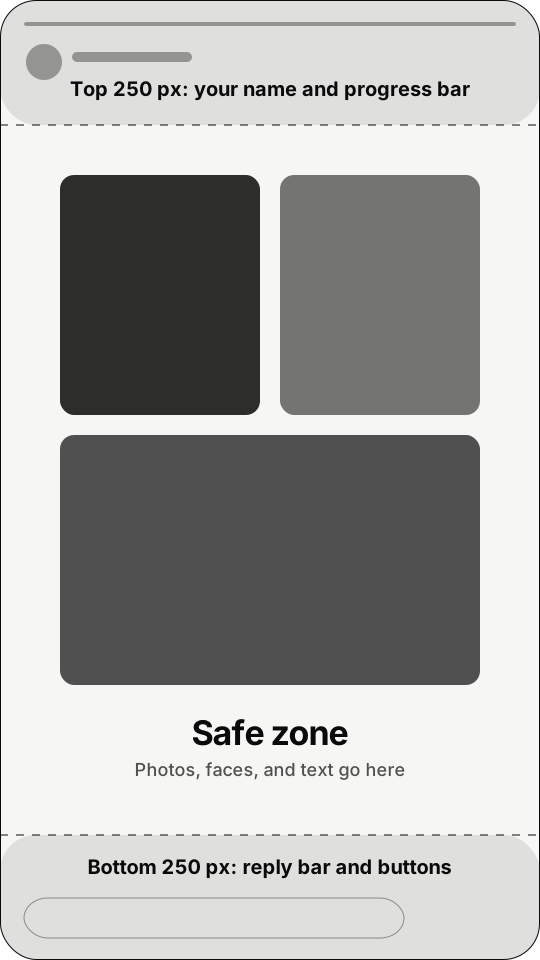
Instagram also covers parts of the screen. Your name and the progress bar sit at the top. The reply bar sits at the bottom. Keep faces and text inside the middle.
| Where | Shape | Pixels |
|---|---|---|
| Instagram story | 9:16 | 1080 × 1920 |
| Instagram reel | 9:16 | 1080 × 1920 |
| Instagram feed post | 4:5 | 1080 × 1350 |
| Safe margin, top and bottom | Story | 250 each |
More sizes are in our collage size guide.
30 Instagram story collage ideas
Aesthetic ideas
- Soft photo dump. Five calm photos with lots of space between them.
- One color week. Only photos that share one tone, like beige or sage green.
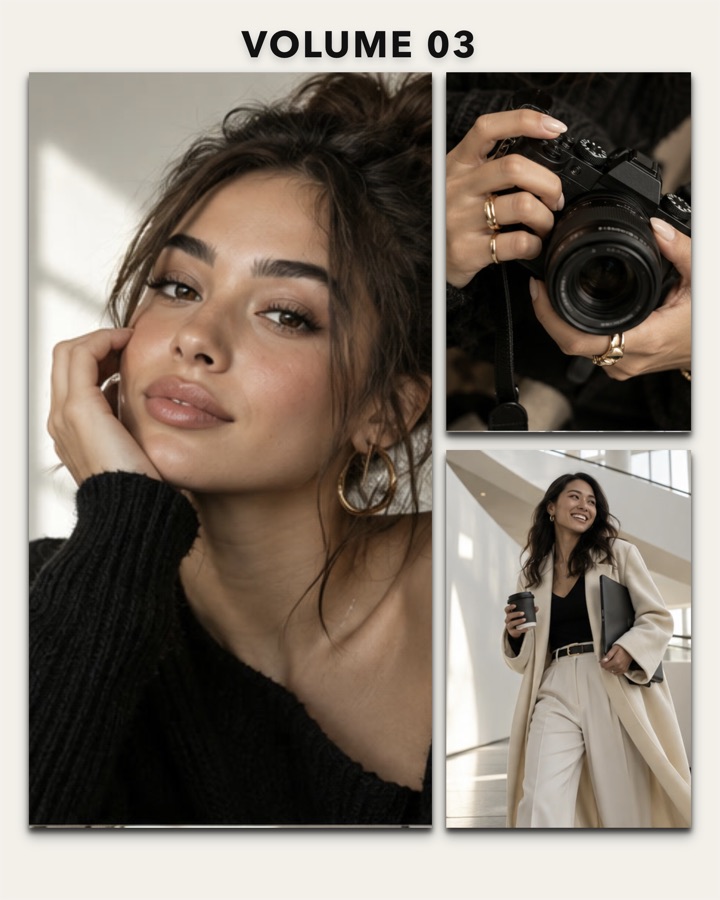
- Magazine cover. One big portrait with a bold title like "Volume 03".
- Film strip. Photos stacked in a vertical row, like a strip of film.
- Window seat. Views from trains, planes, and cafés.
- Torn paper. Photos with rough edges on a cream background.
Birthday ideas
- Happy birthday, best friend. Your four favorite photos of them in heart or star frames.
- Then and now. A childhood photo next to a recent one.
- Party recap. The cake, the people, the dance floor.
- One photo per year of friendship. Great for a big birthday.
- Video birthday card. Clips of friends saying happy birthday, all playing at once.
See more in our birthday collage maker.
Food ideas
- What I ate today. Breakfast, lunch, and dinner in three frames.
- Café hopping. Coffee cups from every place you visited.
- Recipe in 4 steps. Each step in its own frame, with a short label.
- Dinner party table. The full table plus close-ups of each dish.
Travel ideas
- Postcard from somewhere. One big view with the city name and a stamp sticker.
- Day 1, Day 2, Day 3. One photo per day of the trip.
- Golden hour only. Sunsets from the whole trip.
- Video travel diary. Waves, streets, and food clips playing together.
Try our travel collage maker for scrapbook templates.
Friends and couples ideas
- Squad roll call. One photo of each friend, with names.
- Night out. Mirror selfie, the drinks, the blurry dance photo.
- Us, always. Two or three couple photos in heart frames.
- Anniversary timeline. One photo from each year together.
Everyday ideas
- Day in my life. Morning, work, gym, dinner, bed.
- Outfit of the week. Seven outfits in a grid.
- Weekly recap. The best moment from each day.
- Before and after. A room, a haircut, or a project, side by side.
- Mood board. Images that show how you want the month to feel.
- Monthly photo dump. Nine favorites from the month.
- This or that. Two photos side by side with a poll sticker.
Want even more? Browse our 40 photo collage ideas.
Tips for a story collage people actually look at
- Use 3 to 6 photos. More than that and each one is too small on a phone.
- Make one photo the star. Let it be bigger than the rest.
- Match the colors. Use the same filter on every photo.
- Leave space. A little gap between photos looks calm and designed.
- Add one interactive sticker. A poll, question, or emoji slider gets people to tap.
- Keep text short. People spend only a few seconds on each story.
Problems and fixes
I can't find Layout. Update Instagram from the App Store, then open the story camera again and tap the arrow on the left to see all tools. Instagram sometimes moves or tests these buttons, so they can look different on some accounts.
I can only add one photo. Use photo stickers (Method 2) or copy and paste (Method 3) to add more photos on top of the first one.
My collage looks blurry. Make it in the exact story size, 1080 × 1920, and upload the finished image. A small or cropped image gets stretched.
My videos won't play together. Instagram stories cannot play several videos at once. Make a video collage in an app first (Method 5), then upload it as one video.
Instagram cut off my collage. It was the wrong shape. Make it in 9:16 so it fills the whole screen.
The quick answer
For a fast grid, use Layout. For a free scrapbook look, use photo stickers or copy and paste. For a story that looks designed, or for videos and music playing together, make it in a collage app like CollageFlow and upload it as one story.
Questions people ask
How do I put multiple photos on one Instagram story?
Use Layout in the story camera to place photos in a grid. For a free-form look, add each photo as a photo sticker, or copy a photo and paste it into your story on iPhone. For the most control, make the collage in an app like CollageFlow and upload it as one story.
Can I make a video collage on Instagram story?
Not with Instagram's own tools. Layout is for photos, and you cannot play several videos at once inside a story. Make the video collage in an app like CollageFlow, export it in 9:16, and upload it as a single story.
Why can't I find Layout on Instagram story?
Update the Instagram app first. Then open the story camera and look in the tool list on the left side, tapping the arrow to show more tools. Instagram sometimes moves or tests these buttons, so it can look different on some accounts.
What size is an Instagram story collage?
1080 × 1920 pixels, a 9:16 shape. Keep faces and text out of the top and bottom 250 pixels, where Instagram shows your name and the reply bar.
How do I add music to an Instagram story collage?
After you upload the collage to your story, tap the sticker icon and choose Music. Or add music in CollageFlow before you export, so the song is part of the video.
Keep reading.
All articles →
45 Christmas Photo Collage Ideas for 2026 (Family, Couples, Cards & More)
45 Christmas photo collage ideas for families, couples, friends, and kids. Plus card sizes, captions, and how to make one on your iPhone in minutes.
The 7 Best Collage Apps for iPhone in 2026
We compared the most popular collage apps for iPhone. Here is what each one is best at, who it is for, and which one to pick.
How to Make a Photo Collage on iPhone (3 Easy Ways)
The iPhone Photos app cannot make collages. Here are three easy ways to do it anyway, with step-by-step instructions.